-
“I’m in. Let’s Cause Some Responsible Chaos”

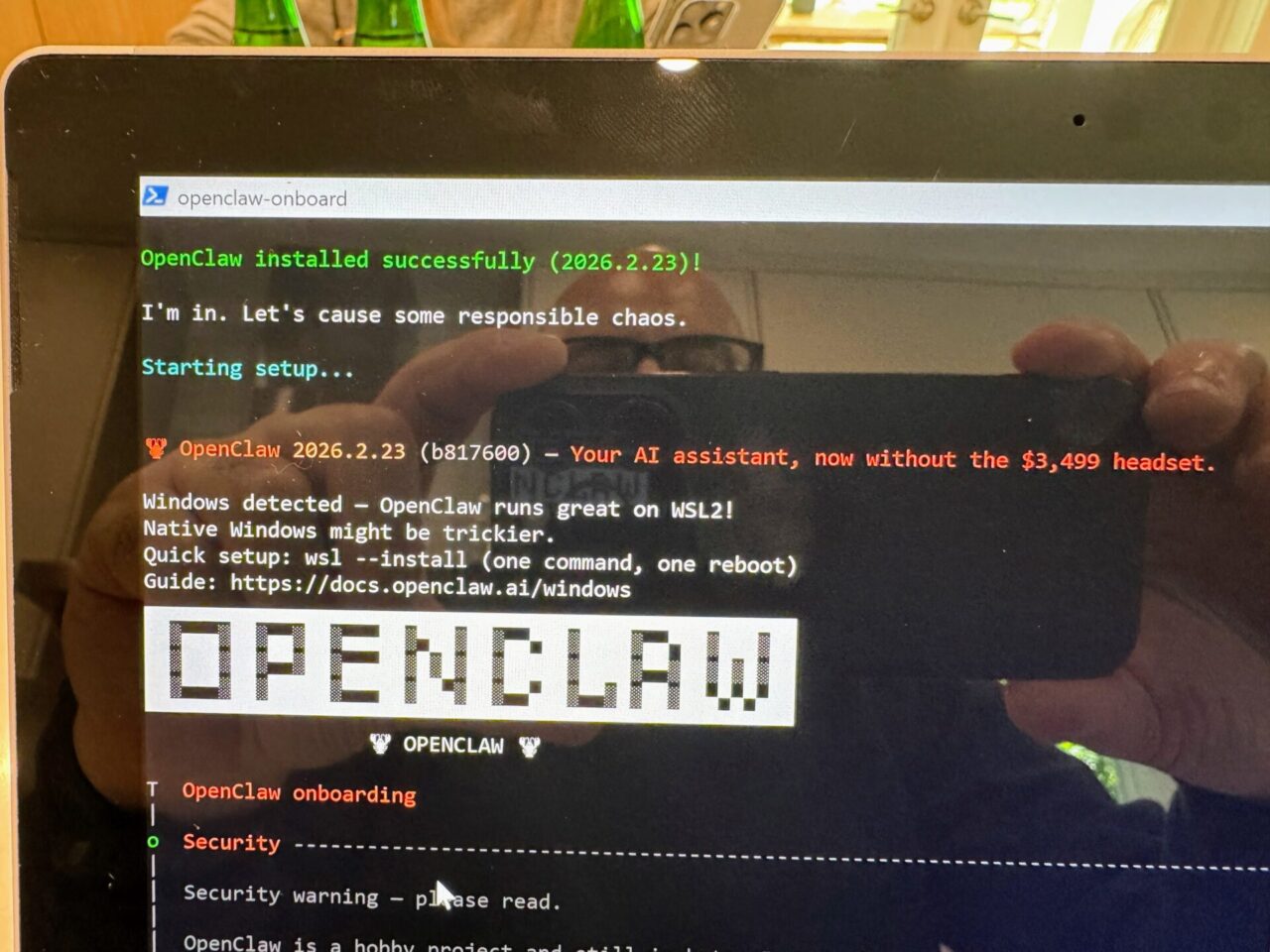
OpenClaw 2026.2.23 being installed on Windows 11 Pro. It rained in Miami this past weekend. Not the usual 20-minute afternoon tropical storm kind, but the all-day, not-going-anywhere kind. So I did what anyone would do with a rainy weekend and time to kill. I went down the OpenClaw rabbit hole. Here’s what happened.
OpenClaw Post Mortem
It took me a while to wrap my head around it, but once you realize OpenClaw is essentially a gateway that connects to multiple APIs — with an obvious emphasis on AI/LLMs — you’re off to the races.
Installation
My first attempt was on Windows 11 via WSL2 (Windows Subsystem for Linux) — a lightweight way to run Linux on Windows without a full VM or dual-boot. Easier to set up, but it keeps OpenClaw sandboxed, with no access to native Windows apps or a local file system.
My second attempt was a native Windows 11 install, which unlocks full control: local apps, OS settings, file system, etc. More powerful, but also more painful — Windows doesn’t come with most of the underlying tools Linux distros take for granted (NodeJS, NPM, Git, Python, C compiler, a terminal, etc.). OpenClaw does a good job of installing dependencies during the onboarding process, but I decided to lay the groundwork first and avoid issues down the road.
I’d imagine this would be a lot simpler to set up on a machine running MacOS — given its NeXTSTEP/FreeBSD origins — so the “Mac mini + OpenClaw” hype is somewhat justifiable (not to mention the M4 processor, a capable Neural Engine, and a palatable price tag).
That said, OpenClaw‘s CLI setup is surprisingly polished — it walks you through gateway configuration, LLM model selection, add-ons, skills, etc. (e.g., Nano Banana for images, Brave API for web search, and so on).
Move Fast and Crack Claws
By the time I decided to play around with OpenClaw, a new version had already come out — “openclaw 2026.2.26” — significantly changing how API keys were handled, for instance. AI assistants such as Google’s Gemini and Anthropic’s Claude also struggle keeping up with OpenClaw‘s documentation. The fact that the tool has already gone through a series of rebrandings (think “the artist previously known as Clawdbot and Moltbot,”) doesn’t help either.
APIs
I started with my existing Google Gemini account (paid,) which quickly proved to be a mistake. The Gemini API throttled requests aggressively, putting me in “cooldowns” ranging from 5 minutes to more than an hour. Adding Grok (free tier) as a fallback didn’t help much either. I eventually settled on a pre-paid OpenRouter account — an interesting model that reminded me of old CDN arbitration — plus a pre-paid DeepSeek account. Side benefit: a solid crash course in API requests, embeddings, quotas and rate limiting.
Call me paranoid, but I also created two separate virtual credit card numbers for these two API keys, just in case my quotas didn’t work and I ended up with thousands of dollars in debt.
The WhatsApp Experiment
I wanted full environment separation, so I dusted off an old Google Pixel phone, grabbed a Tello eSIM ($5/month,) and connected OpenClaw to WhatsApp — all through the CLI, including nifty QR code generation right on the terminal. OpenClaw itself was running on a fresh Windows 11 Pro install on an old Microsoft Surface laptop (great machines, by the way — Redmond’s best synthesis of Vaio, ThinkPad, and MacBook DNA.)
One gotcha: finding WhatsApp group IDs is non-trivial. They look like 120363023456789012@g.us, not phone numbers — and they’re not surfaced anywhere obvious (“openclaw gateway start –verbose” can help catch those IDs).
Claudio Claw, The Friendly Neighborhood Bot
I created a bot — named him Claudio Claw, along with a friendly lobster profile pic — and set strict guardrails: only accept commands from me, no deleting OS files, no changing group settings, default to PT-BR, no over-the-top slang or clichés, stay cool unless “@” mentioned, cite sources, add value, no bullying, do no harm. All of this stored in a “soul.md” file which surprisingly enough could be modified by Claudio himself.
Then I invited him to a small WhatsApp group of childhood friends from Brazil.
He immediately jumped the gun — introducing himself as “Claudio Claw, an OpenClaw AI bot” — breaking one of his core rules (don’t pretend to be human, but also don’t disclose your tech stack.) Two members raised privacy and security concerns on the spot. One left the group immediately (but later returned once I assured him Claudio was gone.) A third accused me of wrecking the group — “Fuck @PS. You’ve managed to destroy the group. Now let that sink in 😂😂😂😂“.
Shortly after the chaos, I noticed a barrage of API errors on the OpenClaw dashboard. Both OpenRouter and DeepSeek had burned through their balances. No tokens, no API, no bot.
Learnings
Get consent first. I mentioned the idea in passing in the WhatsApp group, but I should’ve been more explicit — and maybe even put it to a vote — before dropping an autonomous AI agent into an intimate, very personal group.
APIs are not cheap. Millions of tokens sounds like a lot until you actually use them. Set hard quotas and budget accordingly.
Take Internet claims with a grain of salt. People saying they’re running entire businesses on OpenClaw connected to Salesforce, Figma, Runway, Suno, NotebookLM, Cursor, [insert the latest trendy tool here] at little to no cost — and raking in millions — are probably exaggerating, to say the very least.
Same goes for the dystopian stories. OpenClaw checking your Strava activities data, your bathroom smart scale weight gain trends, and quietly removing junk food from your Instacart grocery cart? Probably not happening at all today — but honestly, we’re likely not that far off.